Categories
iOS Development Programming

iPhone Utility App with EAGLView on Flipside

I am just getting started on OpenGL ES development for the iPhone. There’s a lot of sample code out there, but it’s mostly basic stuff. This post presents (hopefully) a slightly more useful example.

I started with the existing instructions found here. I will not walk you through creating the basic template (OpenGL ES Application and Utility Application) applications in XCode–if you can’t do at least that much on your own, then it’s probably best you learn how to do that much and come back later! The following was done in XCode 3.2.2.

I will repeat the basic steps from the link above and highlight my changes, as such.

  1. Use the utility app as a base
  2. Add QuartzCore and OpenGLES frameworks
  3. Copy EAGLView files (*Render*, EAGLView*) across from your OpenGL template app (these last two steps are easily accomplished having both template application projects open in XCode at the same time and dragging from one project to the other.)
  4. In the FlipsideView.xib file change View to be type EAGLView
  5. In FlipsideViewController add “@class EAGLView” and an EAGLView ivar called glView and make it an IBOutlet property, so it looks like this:
  6. //
    //  FlipsideViewController.h
    //
    
    #import 
    
    @class EAGLView;
    
    @protocol FlipsideViewControllerDelegate;
    
    @interface FlipsideViewController : UIViewController {
    
        id  delegate;
        EAGLView *glView;
    
    }
    
    @property (nonatomic, assign)
            id  delegate;
    @property (nonatomic, retain)
            IBOutlet EAGLView *glView;
    - (IBAction)done;
    
    @end
    
    @protocol FlipsideViewControllerDelegate
    - (void)flipsideViewControllerDidFinish:
            (FlipsideViewController *)controller;
    @end
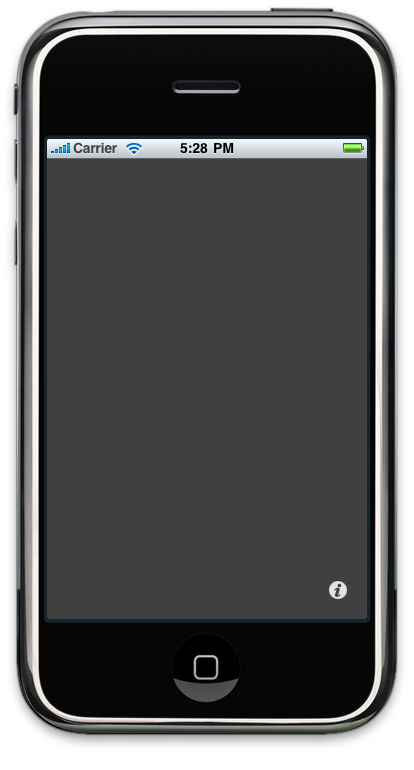
  7. In IB FlipsideView.xib connect from File’s Owner to the new glView.  At this point if you save all files in IB and invoke build and run (ignoring the @synthesize warning,) you have the basic functionality.  Running in the simulator you should see this:
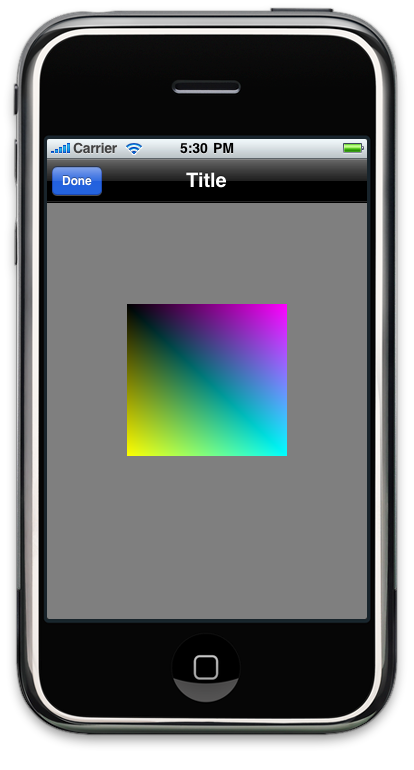
    When you click the info button the flipside will appear and you should see this:
    Note that we have a static image here. The code to animate the colored box is shown in the next step.
  8. Make changes to FlipsideViewController.m methods so it looks like this:
  9. //
    //  FlipsideViewController.m
    //  util
    //
    
    #import "FlipsideViewController.h"
    #import "EAGLView.h"
    
    @implementation FlipsideViewController
    
    @synthesize delegate;
    @synthesize glView;
    
    - (void)viewDidLoad {
    
        [super viewDidLoad];
        self.view.backgroundColor =
             [UIColor viewFlipsideBackgroundColor];
    
        self.glView.animationFrameInterval = 1.0 / 60.0;
        [self.glView startAnimation];
    }
    
    - (IBAction)done {
        self.glView.animationFrameInterval = 1.0 / 5.0;
        [self.glView stopAnimation];
        
        [self.delegate flipsideViewControllerDidFinish:self];
    }
    
    - (void)didReceiveMemoryWarning {
        // Releases the view if it doesn't have a superview.
        [super didReceiveMemoryWarning];
        // Release any cached data, images, etc that aren't in use.
    }
    
    - (void)viewDidUnload {
        // Release any retained subviews of the main view.
        // e.g. self.myOutlet = nil;
    }
    
    - (void)dealloc {
        [super dealloc];
    }
    
    @end
    

At this point, build and debug, then hit the info button–you should have a bouncing box in the flip side! (Note that I’ve added the “@synthesize glView;” as I should have earlier.)

Most of the games I’ve seen present some GUI elements first to select number of players, level, etc., prior to the actual game play. I think this example presents a more realistic template for implementing that use case; selecting number of players and such can be done on the main view then a button push invokes the flip side view for game play. Good luck with your development!

Categories
Embedded Networking

Trials and Tribulations of using Embedded TCP

I was recently called in for a consult on a program that was having trouble with their 802.11 link.

The team working on this program had created a system using a number of embedded micros which were to communicate via Ethernet on an embedded LAN. In my experience, network communications on an embedded LAN normally run fairly smoothly because you are in total control of the environment. You can design the system based on the bandwidth required and put in Ethernet controllers which support those bandwidth requirements.  You can control who talks when and totally avoid the possibility of collisions occurring.

As it turns out that the system created was so complex that the team was unable to get all these micros communicating effectively in a timely fashion while at the same time doing all the number crunching that needed to be done.  The decision was made to backtrack a bit and prototype some of the systems on PCs instead of micros.

This course of action lead to the use of the 802.11 link; what was to be an embedded LAN now became partially embedded and partially a wireless LAN connecting the PCs.  Wireless LANs have their own issues–link saturation, SNR, etc.–some of which I’d had to deal with in the past on prior projects. This is what prompted the request for my help; the team was getting very little data across their wireless link and couldn’t understand why.

After asking a few questions I discovered a couple things:

  1. they were using TCP/IP for their network connections, and
  2. the software engineers had never done network programming

These two factors, combined with the wireless LAN, made for the perfect storm.

The low bandwidth that the team was seeing was due to the fact that TCP uses an exponential backoff mechanism when attempting to guarantee packet delivery. What caused the backoff to occur in the first place were some easily fixed wireless hardware issues.

What compounded the issue was the fact the the socket code on the micros was sending data without regard for the health and status of the socket.  In essence, they were also overflowing their transmit buffers.  This was because the engineers writing the code didn’t know any better.

After shaking my head and rolling my eyes at the state of affairs, the issues were fixed by resolving the wireless hardware issues and instructing the engineers in the use of the select() function to control the flow of data on the socket and monitor its health.

The system now works and the team recently executed a very successful demonstration, but I still have an issue with the fact they are using TCP in the system. Since you control the network and all the traffic on an embedded LAN, TCP is not required.  TCP is designed for traveling long distances through hardware of unknown origin and state; it is not required in a highly controlled embedded environment. In this environment, for this program, UDP is more than sufficient. Here’s why:

  1. The system is tolerant to a small percentage of data loss.
  2. UDP packets are checksummed at higher level–Ethernet CRC checksum and IP Header checksum.  If you get a packet then you are pretty much guaranteed the data is correct.
  3. The 100Mbps links on the system above provides more than ten times the bandwidth required–it had 5 nodes each transmitting less than 1 Mbps.  Staggering their communications to avoid collisions is a simple matter.
  4. Fragmentation can be eliminated by sending data in blocks no larger than a single MSU.
  5. UDP simplifies.  Creating and maintaining connections of a TCP socket can be time consuming and distracting, adding a lot of code with no added value.
  6. UDP datagram loss on a closed embedded LAN is negligible.

Item 5 and 6 above were particularly costly in this instance, many hours were spent maintaining connection oriented code when the occasional loss of data would not have had a negative impact on the system results.  In this case, even including the wireless LAN, iperf tests showed less than 0.02% datagram loss at the bandwidths this system was running.

Just as everything else posted here, this is one engineer’s opinion.  I hope by stating it, I can help you avoid some of the travails I’ve experienced.

Categories
Networking

The End of Endianness

I very much dislike dealing with cross-platform endian issues.   When it comes to defining structures with bitfields–it can sometimes become a pain to order all the fields correctly depending on the platform one is using.

Another headache is dealing with host byte ordering and network traffic on Intel platforms–all that byte swapping!!!

Anyway, I’ve been using some simple functions that allow me to parse the message on the fly while it is still in network byte order with no need for byte swapping or structures with bitfields.

The great thing about this code is that it is cross-platform; absolutely no endian issues to deal with.  The price paid for this portability is execution speed–this code will likely be slower when parsing many fields out of a large message.  But if you only need one or two fields from a large message, then this code will actually be faster than byte swapping the entire message.

Below you will find the bitfield extract code header file, then give a small sample program which uses it, and its corresponding output.

Here’s the bitfieldextract.h header file:

#ifndef __BITFIELDEXTRACT_H__
#define __BITFIELDEXTRACT_H__

#if !defined(WIN32)
typedef unsigned long UINT32;
typedef unsigned short UINT16;
typedef unsigned char UCHAR;
typedef unsigned char *PUCHAR;
typedef char *PCHAR;
#else
#include 
#endif

/*
//
// bfx -- bit field extract
//
// extract up to a 32-bit value at any bit
// offset in a byte array
//
*/
inline UINT32 bfx(
  const PUCHAR cptr,
  UINT32 bit_offset,
  UINT32 bit_len)
{
  /*
  // Portable bit field extract code
  */

  UINT32 byte_off    = ( bit_offset >> 3 );
  UINT32 left_shift  = bit_offset - ( byte_off << 3 );
  UINT32 bytes       = ( left_shift + bit_len + 7 ) >> 3;
  UINT32 right_shift = ( bytes << 3 ) - ( bit_len + left_shift );
  UINT8  cval;
  UINT32 val, i;

  /* grab first byte  and apply shift */
  cval = cptr[byte_off] << left_shift;
  val  = cval;
  bytes -= 1;

  if (bytes) {
    /* shift back high order byte */
    val >>= left_shift;

    /* reset left shift since we did it already */
    left_shift = 0;
  }

  for (i=1;i> right_shift );

    /* reset right shift since we did it already */
    right_shift = 0;
  }

  return val >> ( left_shift + right_shift );
}

/*
// bfxi -- bit field extract and increment
//
// extract up to a 32-bit value at any bit
// offset in a byte array and auto-increment
// the bit offset by the number of bits read
*/
inline UINT32 bfxi(
  const PUCHAR cptr,
  UINT32 &bit_offset,
  UINT32 bit_len)
{
  UINT32 val = bfx(cptr, bit_offset, bit_len);

  bit_offset += bit_len;

  return val;
}

#endif

Here’s a small program that uses it:

#include 
#include "bitfieldextract.h"

using namespace std;

int main(int argc, char* argv[])
{
  UCHAR x[6] = { 0x12, 0x34, 0x56, 0x78, 0x9a, 0xbc };
  unsigned int ofs = 0;
  int i;

  cout << "Binary representation of buffer "
    << "[ 0x12 0x34 0x56 0x78 0x9a 0xbc ]:"
    << endl << endl << "  ";

  for (i=0;i<48;i++)
    cout << bfxi(x, ofs, 1);
  cout << endl << endl; 

  cout << "Each 4-bit nibble:"
    << endl << endl << "  ";

  ofs = 0;
  for (i=0;i<12;i++)
    printf("0x%1x ", bfxi(x, ofs, 4));
  cout << endl << endl; 

  ofs = 2;
  cout << " 2 bits at " << ofs << " = ";
  cout << bfxi( x, ofs, 2 ) << endl;
  cout << " 4 bits at " << ofs << " = ";
  cout << bfxi( x, ofs, 4 ) << endl;
  cout << " 6 bits at " << ofs << " = ";
  cout << bfxi( x, ofs, 6 ) << endl;
  cout << " 8 bits at " << ofs << " = ";
  cout << bfxi( x, ofs, 8 ) << endl;
  cout << "10 bits at " << ofs << " = ";
  cout << bfxi( x, ofs, 10) << endl;

  for (i=4;i<=8;i++) {
    ofs = i;
    cout << "32 bits at " << ofs << " = ";
    printf("0x%08x\n", bfxi( x, ofs, 32));
  }
  ofs = 16;
  cout << "32 bits at " << ofs << " = "; 
  printf("0x%08x\n", bfxi( x, ofs, 32));

  return 0;

}

And the associated output:

Binary representation of buffer [ 0x12 0x34 0x56 0x78 0x9a 0xbc ]:

  000100100011010001010110011110001001101010111100

Each 4-bit nibble:

  0x1 0x2 0x3 0x4 0x5 0x6 0x7 0x8 0x9 0xa 0xb 0xc

 2 bits at 2 = 1
 4 bits at 4 = 2
 6 bits at 8 = 13
 8 bits at 14 = 21
10 bits at 22 = 632
32 bits at 4 = 0x23456789
32 bits at 5 = 0x468acf13
32 bits at 6 = 0x8d159e26
32 bits at 7 = 0x1a2b3c4d
32 bits at 8 = 0x3456789a
32 bits at 16 = 0x56789abc